
Business websites
What Should a Service Business Website Include to Get More Inquiries?
A practical guide to clear service pages, credible proof, contact forms, mobile usability, and reliable follow-up. Includes a printable website checklist.
The short answer
What should a service business website include to get more inquiries?
Start with a clear explanation of your service, relevant evidence that customers can trust, and an easy way to contact you. Support that with useful service details, an accessible mobile experience, and a reliable process for receiving and following up on inquiries.
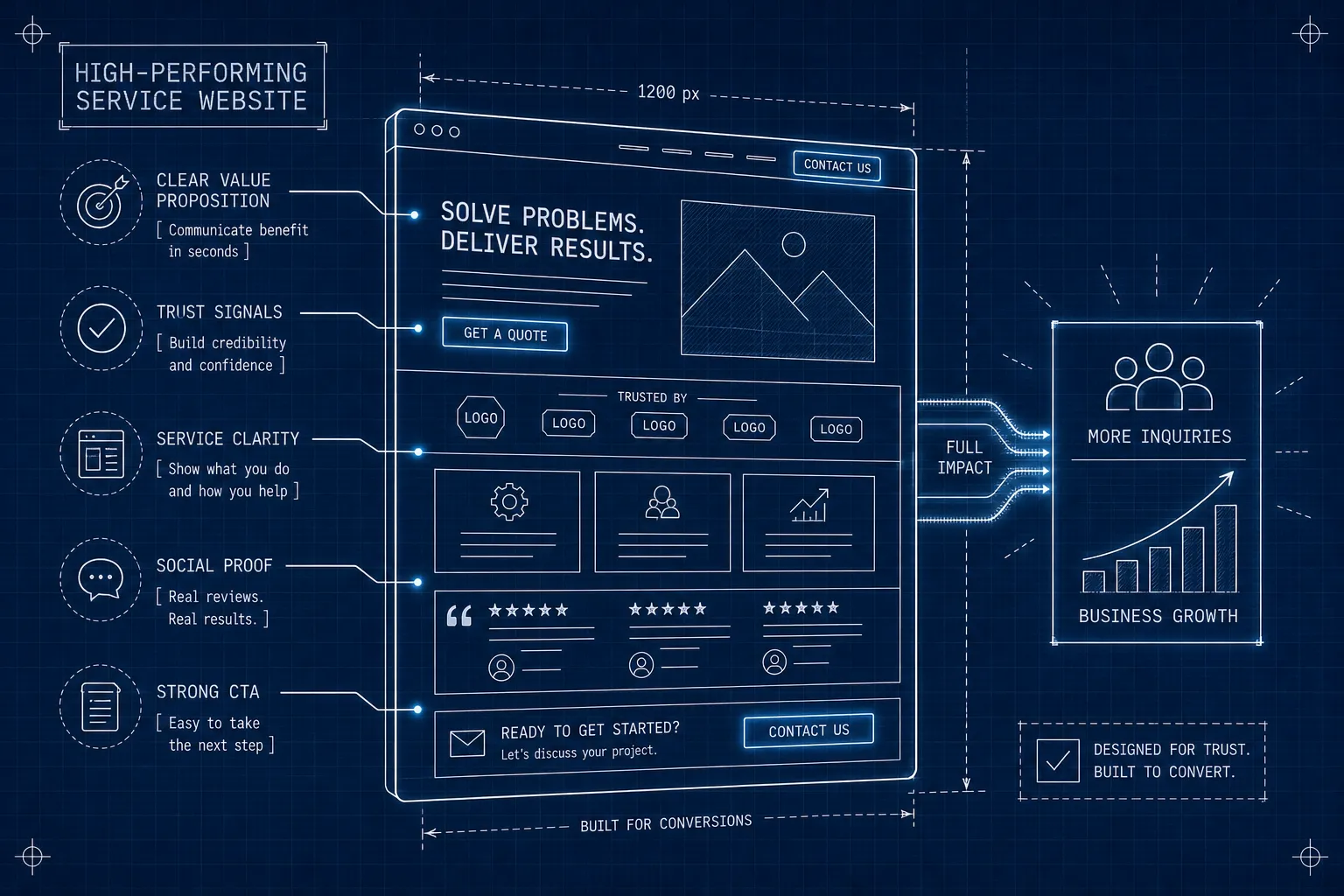
Concept illustration showing website elements and an illustrative growth chart.
A visitor should be able to work out whether you can help, why they should trust you, and what happens when they get in touch. Your team then needs to receive that inquiry and act on it.
That sounds straightforward, but the weak point can sit anywhere in the process. A clear page cannot compensate for a broken form. A working form cannot explain an unclear offer. And an inquiry that reaches an unattended inbox still needs a person responsible for answering it.
Use this guide to review the whole journey before deciding what to change. The goal is to help suitable customers contact you and receive a useful response.
Start with the resource: Download the free, two-page Service Website Inquiry Checklist (PDF). It includes a practical inspection list, space to record problems, and a worksheet for choosing the next fixes. No signup required.
The six parts of a useful inquiry journey
| Part | What the visitor or your team needs to know |
|---|---|
| Clear offer | Do you provide the service I need, for someone like me? |
| Relevant proof | What evidence helps me judge whether you are a good fit? |
| Contact path | How do I reach you, and what information do you need? |
| Service details | What is included, what affects the cost, and what happens next? |
| Usable mobile experience | Can I read, navigate, and complete the task on my phone? |
| Reliable follow-up | Did the inquiry arrive, who owns it, and when will they respond? |
These are review areas, not a formula that guarantees more leads. Your results also depend on the audience reaching the site, your offer, demand, and the way your business handles inquiries.
How to build the inquiry journey in order
Start with the customer you want to help and the request your team can handle. Write down what counts as a suitable inquiry: the service needed, the area covered, and any essential information required before you can respond.
Then build the journey in this order:
- Plan the route. Identify the page people will enter through, the questions it must answer, and the contact action it leads to.
- Prepare the explanation and proof. Write the service scope and gather accurate examples, photographs, or qualifications that support it.
- Build the page and contact task together. The form or booking flow should match the promise on the page and ask for information the team actually needs.
- Connect the destination. Decide where the request goes, who owns it, and how missing or duplicate information is handled.
- Test the complete task. Follow an ordinary request on a phone and a computer, then verify receipt and the next action with the responsible person.
- Measure suitable completed inquiries. Keep unsuccessful attempts, duplicate contacts, and unrelated messages distinguishable from the opportunities the website is meant to support.
Work through the sections below as you complete each stage. You can apply the sequence to a new website or a focused improvement to an existing one.
1. Make your offer clear at the top of the page
Start with a headline that identifies the service and the people it is for. Include your service area when location affects whether you can take the job. Supporting text can explain the outcome, the scope, or a useful point of difference.
For example, a hypothetical roofing business might use “Roof repair for homeowners in Kansas City”, followed by a sentence explaining the kinds of repairs it handles. That gives someone more information than a broad statement such as “Built on excellence.” Only mention same-day appointments, free estimates, or other commitments when you actually offer them.
Place a clear next step close to that explanation. “Request an inspection,” “Ask about your project,” and “Request a callback” describe different actions. Choose the one your process can deliver, and make sure the next screen matches the promise.
Repeat the contact option at sensible points in a longer page, such as after the service explanation or pricing guidance. Visitors should be able to reach it when they have enough information to decide.
Quick check: Ask someone unfamiliar with your business to read the first screen and describe what you do, who you help, and how to contact you. Their uncertainty is useful evidence about what needs explaining.
2. Show credible proof alongside the relevant service
Choose evidence that answers the customer's likely concern. A review might describe communication and reliability. A project example might explain how you handled a difficult requirement. Relevant licenses or certifications can help someone check qualifications where those matter.
Use real, current material that you have permission to publish. Preserve the meaning of a customer's words, link to the original review when possible, and keep displayed ratings and review counts up to date.
For project examples, explain:
- The customer's problem and the constraints involved.
- What you did and what was included in the work.
- The result you can substantiate, with appropriate context.
A detailed description can be useful even when you do not have a measured financial result. Label concepts and demonstrations clearly. Avoid presenting a mockup as completed client work or adding a percentage improvement that was never measured.
Place a relevant example near the service or decision it supports. A testimonials or portfolio page can still be useful as a fuller collection; visitors should also encounter helpful evidence while reading about the work they need.
For a closer review of the claims, evidence, and presentation on your pages, use our website credibility and trust guide.
3. Ask for the information you need to handle the inquiry
There is no universal best number of contact-form fields. Each required field should have a purpose, such as identifying the service needed, checking the service area, or providing a way to reply.
A simple starting form might ask for a name, an email address or phone number, the service needed, and an optional message. Add a contact preference if needed. A contractor may also need a postcode to check coverage. A specialist project may need more context to determine whether the inquiry is a fit. Explain unusual requests and save detail that can wait for the conversation.
Make required fields clear, use visible labels, explain errors beside the relevant field, and show an unmistakable confirmation after a successful submission. These practices are covered in the W3C's accessible forms guidance.
Button text should accurately describe the action. “Request a quote” makes sense for a quote request; “Confirm booking” should only appear when the action actually confirms a booking.
Beside the form, explain what happens next. If your team can reliably reply within one business day, say so. If a request arrives outside working hours, explain how it will be handled. Offer a working phone number or email address when those are suitable alternatives.
Test it: Submit an inquiry with permission from the team receiving it. Check the success screen, the destination inbox or CRM, and any acknowledgment. A successful-looking screen alone does not prove that a person received the request.
If the form confirms success but the notification is missing, follow the contact-form email troubleshooting guide to locate the last verified step and collect evidence for a repair.
4. Give each service enough detail to support a decision
A list of service names is often not enough for someone deciding whether to hire you. Explain the scope of the work, who it suits, relevant exclusions, the steps involved, and the information needed to get started.
Separate service pages are useful when services have meaningfully different audiences, requirements, or questions. A small business with one closely related offer may explain it well on a single page. Create additional pages when they provide substantive information, rather than repeating the same text with a different service name.
For each important service, consider including:
- A plain-language description of what is included and excluded.
- Examples or evidence relevant to that work.
- A process overview, including the next step after an inquiry.
- Honest pricing guidance or the factors that determine a quote.
- Answers to questions that come up in real customer conversations.
- A relevant way to contact you.
Pricing guidance does not have to be an exact figure. You can explain what changes the cost, how you prepare a quote, and whether an assessment has a fee. Publish a range or starting price only when it is accurate and its conditions are clear.
Google's SEO Starter Guide recommends useful, well-organized content and descriptive links. Those principles support a clear service-page structure; they do not make a particular page count a ranking requirement.
5. Check the actual experience on a phone
Test the pages people land on, not just the homepage. Open a service page on a phone, read it, find the contact option, and complete the form. Then repeat the task on a computer and with keyboard navigation.
Look for text that becomes hard to read, controls that are difficult to select, overlays that cover the form, content that shifts during loading, and error messages that are easy to miss. Check that zoom remains usable and that phone or email fields offer appropriate input behavior.
PageSpeed Insights can help investigate performance. Google's Core Web Vitals guidance covers loading, responsiveness, and visual stability. Some pages will not have enough real-user data for every report, and a good performance score does not tell you whether your offer is convincing.
Use technical checks alongside a real attempt to complete the customer's task.
6. Connect the inquiry to a person and a next action
The website is the beginning of the conversation. Decide where new requests go, who checks them, and what happens if that person is unavailable.
An illustrative workflow could look like this:
- A visitor submits a request for a roof inspection.
- The site confirms receipt and gives an honest response expectation.
- The request reaches a shared inbox or CRM and is assigned to someone.
- That person checks the service area and contacts the customer.
- The team records the next step, such as an appointment or a request for more detail.
An automated acknowledgment can confirm receipt, but a customer still needs a useful response. Choose a response target your team can meet, monitor missed requests, and explain any alternative channel for urgent needs. Avoid promising a five-minute callback when no one is available to deliver it.
For a small team, this may work with a shared inbox and a clear routine. As volume or complexity grows, an integration or CRM may help keep responsibility and follow-up visible.
Measure completed inquiries and their quality
Decide what counts as an inquiry before comparing results. A click on a phone link shows an attempt to call; it does not prove that a call connected. Opening a form is different from successfully sending it. Multiple messages from one person may represent one opportunity.
Choose a consistent definition and record enough information to distinguish spam, existing-customer requests, and suitable new-business inquiries. Track bookings or accepted proposals separately so you can see what happens after contact.
For illustration, if 500 measured sessions produce five completed inquiries, that is one inquiry per 100 sessions. Fifteen inquiries from the same number of sessions would be three per 100. These are hypothetical numbers to explain the calculation, not an industry benchmark or a forecast. They also do not account for inquiry quality.
Compare periods using the same measurement method, and consider changes in traffic sources, seasonality, advertising, or your offer. With low volumes, a small number of inquiries can noticeably change the percentage.
If the numbers and the requests your team receives do not line up, our guide to diagnosing missing website inquiries helps trace the gap from traffic through submission, delivery, and follow-up.
For the measurement itself, use the website inquiry tracking guide to distinguish browser events, received requests, repeated deliveries, and qualification decisions in a reconciliation sheet.
Choose the next fixes before deciding on a redesign
Start with problems that prevent contact or delivery: broken forms, incorrect phone numbers, failed notifications, or requests with no owner. Then address unclear service information, missing evidence, and usability problems.
Use the downloadable checklist to record the affected page, what you observed, the next fix, and the person responsible. Pick a few changes you can verify and set a review date.
A redesign may be appropriate when the existing structure or platform prevents necessary improvements. Focused repairs may be enough when the underlying site works. The decision should follow the problems you can demonstrate.
Frequently asked questions
Should every service have its own page?
Use a separate page when a service needs a distinct explanation, has different customer questions, or benefits from its own examples and contact path. Closely related services can share a page when readers can still find the detail they need. Avoid creating near-identical pages just to cover keyword variations.
How many fields should a contact form have?
Ask for what you need to respond or determine whether the request is suitable. Make the rest optional or collect it later. Test completion and inquiry quality together; a shorter form is not automatically better if it removes information essential to handling the request.
Do FAQs help with SEO?
Useful FAQs answer real customer questions and make the page more complete. They are not a ranking shortcut. Google retired FAQ rich results in May 2026, so adding FAQ markup should not be presented as a way to obtain that search feature.
What if I do not have customer reviews yet?
Explain your process, identify who does the work, show relevant experience you can substantiate, and clearly label any demonstration projects. You can add genuine customer feedback as it becomes available. Do not invent testimonials, ratings, or completed projects to fill the space.
Review your website's next step
Work through the checklist on your homepage, one important service page, and your contact flow. Trace a test inquiry all the way to the person responsible for responding.
Wallace Shift's free website first check can provide a starting point for mobile loading and basic technical checks. It does not evaluate your offer, persuasive copy, or the full inquiry journey.
If you want to discuss those parts together, tell us what is happening on your website. You can also review our website services and website packages before deciding on a next step.